Apr 23, 2014

Digital Assessments

Monday, April 21st I used some after-school time to share some tools for creating digital assessments. One of the great things about being able to use digital tools to assess is the wide variety of methods available for creating the assessments. Here are some more reasons I shared for using digital assessments:


To the last bullet point, I also shared this photo. It's my classroom at my previous school, rearranged for blended learning.  The table islands you see in the middle were set up so that students could take assessments when THEY were ready to take them.

In a 1:1 environment, one of the things you'll notice is that the classroom becomes much more "student centered"; with that comes opportunity to differentiate not only learning but assessing.

If the teacher has a self-paced learning environment for a particular lesson or unit it only makes sense that students, if feasible, should not have to take assessments as before -- all on the same day.  Some students are, after all, ready after 3 days; others not for 6.  So students could sign up to take an assessment when ready and would be asked to take it in my presence in that area.  I planned it so that the first 10 minutes of assessment days in class would be for general questions; then, students with further needs could quietly approach me with their laptops for other questions while I stayed in the assessment area.

Not something a teacher would always have to do, but this kind of flexibility can be great for students and is much more easily achieved in a 1:1 environment.


So here is the list of resources/ links/ notes for what was shared in the session.  Browse below or get your own copy by using THIS LINK


Apr 12, 2014

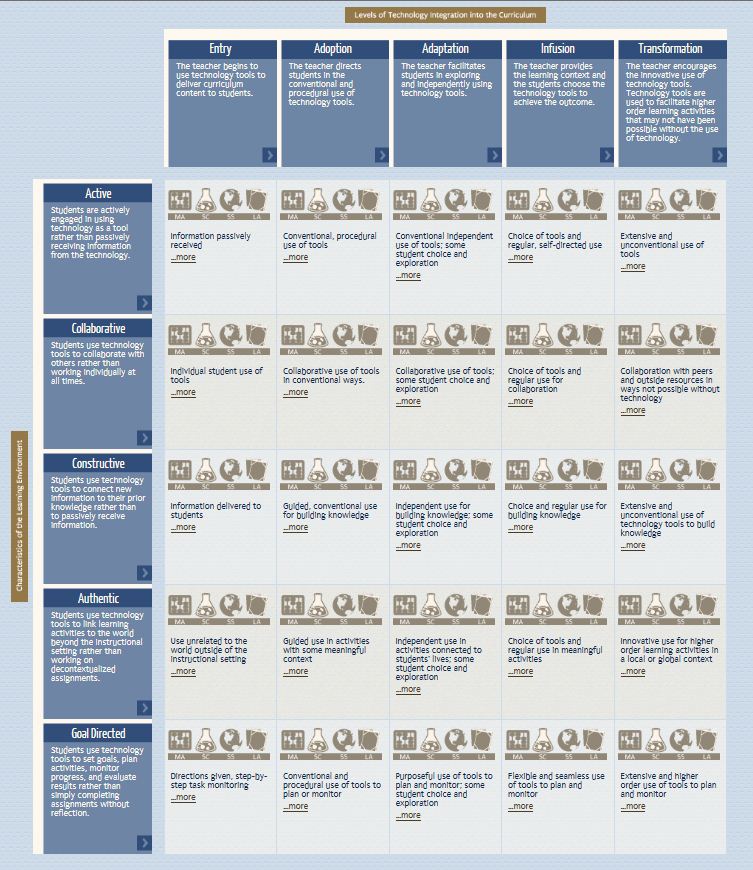
Technology Integration Matrix & Videos


As you experiment with new ways of enhancing learning through the use of technology, you'll continuously be assessing which digital lessons provide the most bang for your buck in terms of meeting your curriculum needs while still creating a meaningful learning environment. 


Here's some food for thought:


  The Florida Center for Technology Development has created the Technology Integration Matrix, which is comprised of characteristics of purposeful learning environments crosswalked with teacher technology integration levels. 

What's especially helpful is that, in publishing this matrix, they've also embedded videos of teachers discussing/demonstrating lessons in core subjects (math, science, social studies, language arts) to illustrate each cell of the matrix. I don't know about you, but I always learn a lot just from glimpsing inside another classroom.


NOTES:

  • Although these cover only core subjects, a teacher of any subject can benefit as the purpose is to inspire and get your own creative juices flowing -- the same is true for videos that do not take place in a middle school classroom. 
  • The schools here seem to be Apple/MAC happy, but adjusting the lessons to a PC or Chromebook format shouldn't pose an impediment to using the ideas presented.

***********************
*Here is the MAIN MATRIX LINK WITH VIDEOS ; FYI: The videos use Quicktime ...  you  may be asked for permission to run the video OR you may have to download it if it's not already on your computer;  HERE is where you can download if need be.   
***********************


As you view the matrix, I hope you won't make the mistake of "judging" yourself based on where you are on the matrix -- instead, use it as a way to see, over time, how your classroom -- and you -- are transforming.